Easy Guide - One Click Disable Autostarts ( Speed up your android phone )
A Newly Refreshed or New Phone Runs Smoothly.
When you fill up your android phone with Apps, Games and Widgets, Your Android phone becomes too slow. I have discovered a new app that helps this process by one click ( well mostly ). Needs Rooted Phone.
Install HiTask From Play Store (It look like chinese but its english)
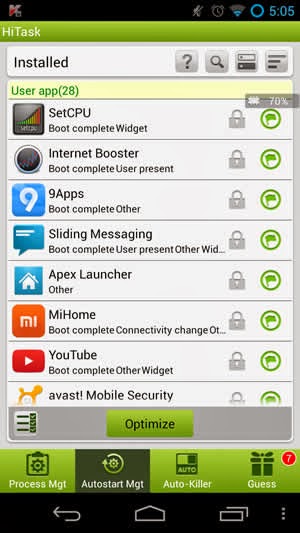
Goto "Autostart Mgt" Tab from bottom.
The lock sign states No Optimizing for Locked Sign.
Here you can lock Facebook, Whatsapp like apps which you want to keep running in background.
For Power Users:
If you are a power user, then you can just tweak it more to get more free ram & resources:
Like you can disable lock from system apps (click bottom Tag: System app(...) ) like youtube , google search , dropbox, google play music, music hub, s voice, maps, hangouts , many others you don't want to Autostart.
From The flag sign you can enable or disable autostart services or app.
Please comment your results
Comments